Documentation
Booking rules, notice & cancellations
Booking rules control how clients can book — the notice you need, how slots are spaced, what details you ask for, and what happens when someone cancels. You set them under Settings → Booking rules. (When clients can book is separate — that's your opening hours.)
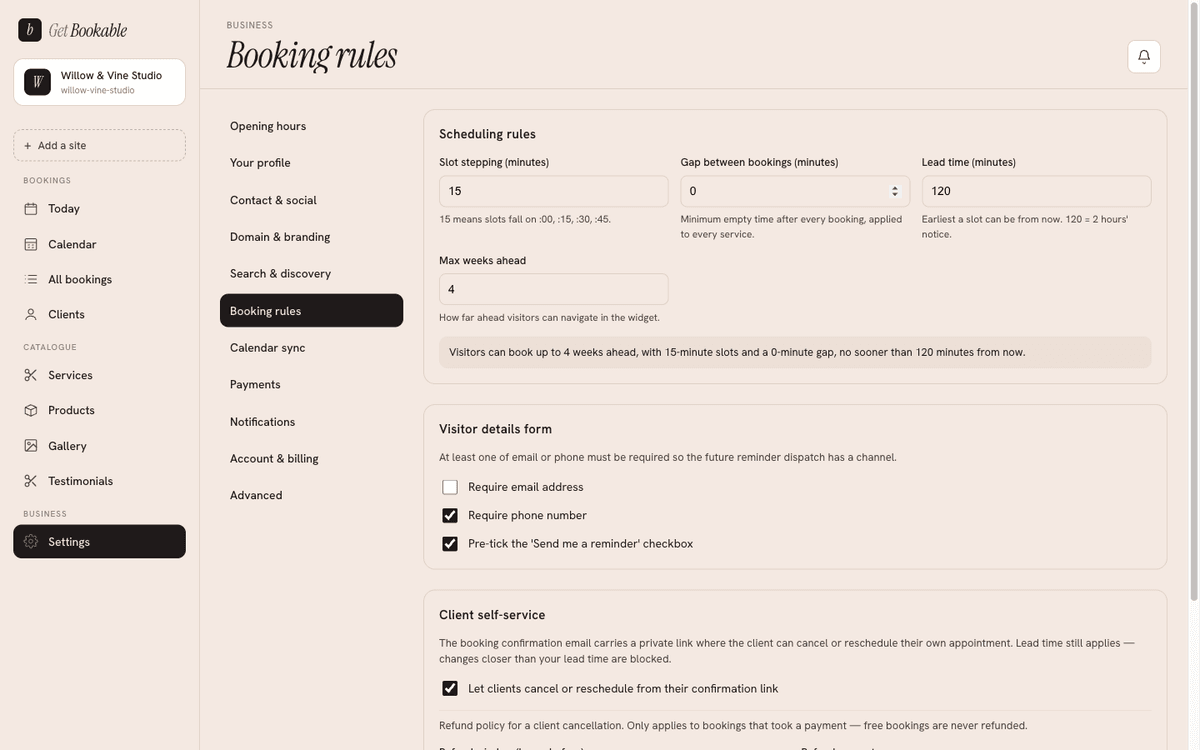
Slot timing
Four settings shape the times your booking page offers:
- Slot stepping — the interval between offered start times. With 15-minute stepping, clients can start on the hour, quarter past, half past, and so on.
- Gap between bookings — buffer time added after each booking, for cleanup or turnaround, so the next slot isn't offered too soon.
- Lead time — the earliest a slot can be from now. 120 minutes means clients need at least two hours' notice; it stops last-minute bookings you can't prepare for.
- Max weeks ahead — your booking horizon: how far into the future clients can navigate and book.
Slots are only offered when they also fit your opening hours and the chosen service's duration, and don't clash with an existing booking or busy time from a connected calendar.
The details you ask for
Under Visitor details form you choose what a client must provide to book:
- Require email address and Require phone number — turn each on or off (you need at least one way to reach them).
- Pre-tick the "Send me a reminder" checkbox — when on, clients opt in to a reminder by default (they can still untick it). See Notifications & reminders.
Client self-service: cancel & reschedule
Turn on Let clients cancel or reschedule from their confirmation link to let clients manage their own booking from the secure link in their confirmation email — no back-and-forth with you. When it's off, only you can change a booking.
Refunds on cancellation
When self-service is on and the booking was paid, your refund policy decides what a client gets back if they cancel:
- Refund window (hours before) — refund a cancellation made at least this many
hours ahead. Set it to
0to never refund. - Refund amount — inside the window, refund either the full amount or a partial percentage (for example 50% to keep half as a deposit).
- Also reverse the platform fee — optionally give back the platform fee in proportion to the refund, rather than absorbing it.
Cancellations outside the window aren't refunded. Refunds settle back through Stripe, the same way the payment came in.
Changing your refund policy affects future cancellations. Bookings already made keep the terms that applied when they were booked.